Image

Image 2

(optional)

Formats: .png, .jpg, .jpeg, .webp

Max size: 20MB

credits : 1

Animate Photo AI

Make pictures move with AI. Upload a photo, guide the motion with a prompt, and create animated videos from portraits, landscapes, products, or old photos.

AI Video Generator Interface

How to Animate a Photo with AI

Use Animate Image AI to make a still picture move in three steps.

  1. Upload the photo or picture you want to animate.
  2. Write a motion prompt such as make the person smile, add wind, zoom in slowly, or animate the background.
  3. Generate the animated photo video and iterate with a clearer motion prompt if needed.

Explore another image-to-video workflow

From still image to video

These image and video pairs come from our existing example library. The prompts are suggested starting points, not the original generation prompts. Results vary by model and settings.

Portrait in a flower garden
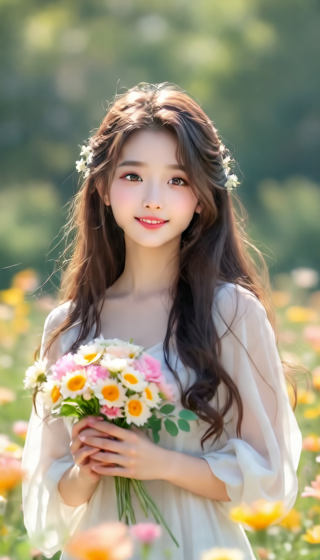
Original image: Portrait in a flower garden
Original image
Example video

Prompt idea (English)

A gentle breeze moves the woman's hair and the flowers around her. She blinks naturally. Keep the camera still, her facial features consistent, and the background stable. Use subtle motion rather than a large head turn.

Animate Photo AI FAQs

How do I animate a photo with AI?

Upload a photo, enter a prompt describing the motion, and let the AI generate a short animated video from the still image.

Can I make a picture move online?

Yes. You can make a picture move online with AI motion prompts such as slow zoom, camera pan, facial movement, product rotation, or moving background.

What photos are best for animation?

Use clear photos with a visible subject, good lighting, and simple background. Portraits, products, pets, landscapes, and artwork are good starting points.

Can I animate a photo without editing skills?

Yes. The AI handles the animation process, so you only need to upload an image and describe the motion you want.

Can I animate photos for marketing?

Yes. Animated product photos, lifestyle images, and campaign visuals can help create short social ads and scroll-stopping content.

How do I avoid strange motion?

Use specific prompts and tell the AI what should stay unchanged. For example, keep the face consistent, only move the camera, or keep the product shape stable.